Systems Engineering: Automating Encrypted Backups with BorgBackup on Linux
A persistent and dangerous misconception in systems administration is that RAID constitutes a backup. It does not. RAID protects exclusively against hardware drive failure. If an administrator accidentally deletes a critical directory, or a ransomware payload executes, RAID will seamlessly and instantly replicate that destruction across all mirrored drives.
For genuine disaster recovery, an isolated, versioned, and encrypted backup strategy is mandatory.
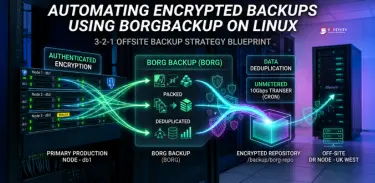
BorgBackup (Borg) is an industry-standard, open-source, deduplicating backup engine. It offers authenticated client-side encryption and performs block-level deduplication, meaning it only stores the delta changes made since the last execution.
Step 1: Package Installation
Borg is available in the default repositories of almost all major Linux distributions. On Ubuntu/Debian environments, execute:
apt update
apt install -y borgbackup
borg --version
Step 2: Repository Initialization A "repository" is the destination folder where Borg stores the deduplicated chunks. This can be a local directory, a mounted drive, or a remote storage server via SSH.
Bash mkdir -p /backup/borg-repo borg init --encryption=repokey /backup/borg-repo Warning: You will be prompted to create a passphrase. Because Borg utilizes absolute encryption, losing this passphrase results in permanent, unrecoverable data loss. Store it securely in a password manager.
Step 3: Executing a Backup To back up the web root and system configurations, utilizing the {now} variable for dynamic archive naming:
Bash borg create --stats --progress
/backup/borg-repo::"Backup-{now:%Y-%m-%d_%H:%M}"
/var/www/html /etc The --stats flag outputs the deduplication metrics. Because Borg only copies modified data blocks, subsequent runs will complete in fractions of the original time.
Step 4: Automation and Pruning (Bash & Cron) Manual backups are a liability because they rely on human memory. Create a bash script to handle execution and retention pruning automatically.
Create the file: nano /usr/local/bin/borg-backup.sh
Bash #!/bin/bash
Export the passphrase so Borg doesn't prompt for interactive input
export BORG_PASSPHRASE="YOUR_SUPER_SECRET_PASSPHRASE"
REPOSITORY="/backup/borg-repo" LOG="/var/log/borg-backup.log"
echo "Starting backup: $(date)" >> $LOG
Create a new backup archive
borg create --stats
$REPOSITORY::"Auto-Backup-{now:%Y-%m-%d_%H:%M}"
/var/www/html /etc >> $LOG 2>&1
Prune old backups (Keep daily backups for 7 days, weekly for 4 weeks)
borg prune --list --keep-daily=7 --keep-weekly=4 $REPOSITORY >> $LOG 2>&1
echo "Backup finished: $(date)" >> $LOG echo "-----------------------------------" >> $LOG Make the script executable and append it to your root crontab to run daily (e.g., at 2:00 AM):
Bash chmod +x /usr/local/bin/borg-backup.sh crontab -e Add the following line:
Plaintext 0 2 * * * /usr/local/bin/borg-backup.sh Step 5: Restoration Procedures A backup is useless if it cannot be restored. To view all available snapshots in your repository:
Bash borg list /backup/borg-repo To restore a specific snapshot (e.g., Auto-Backup-2026-06-01_02:00) to a temporary recovery directory:
Bash mkdir /tmp/recovery && cd /tmp/recovery borg extract /backup/borg-repo::"Auto-Backup-2026-06-01_02:00"